DIY MeshCore Companion Node: RAK19003 Slim and Nano Builds
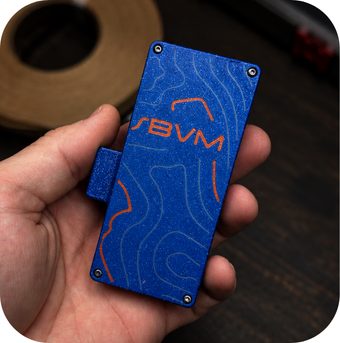
A DIY MeshCore companion node is a small LoRa 915 MHz radio that pairs with your phone over Bluetooth so you can text on the mesh without cell service. The simplest build we know uses a RAK19003 WisBlock Mini kit, a flat LiPo battery, and a 3D-printed case.
It is the same RAK19003 base board our Pocket Mesh Node uses around Bryan–College Station. Below are the two versions we build, Slim (whip antenna, bigger battery) and Nano (smallest pocket size), with every part linked and prices checked on Nov 1, 2026.
Quick answer
Start with the RAKwireless WisBlock Mini starter kit (RAK19003 base + RAK4631 core, US915). It is about $31.97, it sips power, and it charges a LiPo over USB-C. Add a JLJLUP 103450 LiPo (2000 mAh) with a JST PH 2.0 mm plug and a Muzi Works 17 cm whip for the Slim build. For the Nano, add a Qimoo 102535 LiPo (850 mAh) and keep the small PCB antenna from the kit inside the case.
Flash MeshCore companion firmware, set the USA/Canada (Recommended) preset, and pair it with the MeshCore app. The same hardware also runs Meshtastic. Around Bryan–College Station, we recommend MeshCore, because that is what our local repeaters run.
Parts list: Companion Node Slim
- RAK WisBlock Mini starter kit, US915: Amazon or Rokland, about $31.97 at both
- Muzi Works 915 MHz 17 cm whip: Amazon, about $12.90
- JLJLUP 103450 LiPo, 2000 mAh, JST PH 2.0 mm plug, built-in protection circuit, 2-pack: Amazon, about $16.99 for two (sold out? try this PKCELL 803860 2000 mAh LiPo at Rokland, $12.97 — slightly bigger at 60×38×8 mm vs ~50×34×10 mm; still check polarity)
- A short U.FL (IPEX) to SMA-female bulkhead pigtail, so the whip has a jack to screw into (see the antenna section). If you buy the kit from Rokland, it comes with an IPEX to SMA lead. Check whether that lead is a bulkhead SMA-female before you buy another.
- 3D-printed case, which we print ourselves in PETG or ASA
Parts list: Companion Node Nano
- RAK WisBlock Mini starter kit, US915: the same kit as above, from Amazon or Rokland
- Qimoo 102535 LiPo, 850 mAh, JST PH 2.0 mm plug: Amazon, about $8.99 (pick the 102535 850mAh size on the page; sold out? try this 102535 850 mAh LiPo, $8.49 — polarity not stated, so keep the red-wire-to-+ check)
- 3D-printed case, with the kit's PCB LoRa antenna and Bluetooth antenna tucked inside
Consumables for either build
- M2 heat-set inserts for case screws: Amazon, about $5.99 for 150
- M3 heat-set inserts if your case uses M3 screws: Amazon, about $9.99 for 300
- Gorilla Clear Grip to tack the battery and bulkhead in place: Amazon, about $5.99 (sold out? try this Gorilla Clear Grip 3 oz 2-pack, $15.47 — general-purpose contact adhesive, not the Diamond Art & Jewelry bottle)
- A few small screws, and a soldering iron to set the inserts. If the node will ride on a dash or sit in a Texas window, print the case in ASA rather than PLA, because PLA softens in a hot car.
Option 1: Companion Node Slim, the one we carry most

The heart of both builds is the RAK WisBlock Mini starter kit. The kit has the RAK19003 Mini base board, the RAK4631 core (an nRF52840 with an SX1262 LoRa radio), small IPEX LoRa and Bluetooth PCB antennas, a USB-C to USB-A cable, and assembly screws. Rokland's listing for the same kit also includes a small dipole antenna with an IPEX to SMA lead. The Amazon listing does not mention those two parts. RAK's datasheet lists the base board at 30 x 35 mm. It has a USB-C port that also charges the battery, a 2 mm JST PH battery jack, and a 1.5 mm JST ZH solar jack. The Amazon listing says the kit ships flashed with Meshtastic, so plan to reflash it with MeshCore.
Why the RAK instead of an ESP32 board? Battery life. The nRF52840 idles at very low current. That is why RAK boards are the most common solar repeater boards we see, including in our $5 Harbor Breeze solar node build. On a companion, it means you aren't recharging every night, as you often have to with ESP32 boards.
Antenna: the whip makes the Slim

The kit's PCB antenna works, but it is a compromise. The Slim swaps it for a Muzi Works 915 MHz 17 cm whip, the same handheld whip we recommend in our 915 MHz antenna upgrade guide. Muzi's listing quotes an SWR of 1.3, compared with 3.5 for a stock stubby antenna. We have not measured that ourselves.
One catch: the RAK4631 has a tiny U.FL (IPEX) antenna jack, and the Muzi whip has an SMA male plug. You need a short U.FL to SMA-female bulkhead pigtail mounted through the case. Our SMA vs RP-SMA vs N-type guide explains why "SMA" alone is not enough when you order. Get SMA, not RP-SMA, or the whip will not mate.
Battery: about 2000 mAh in a flat pack

The Slim uses a JLJLUP 103450 LiPo, 2000 mAh (7.4 Wh), about 34 x 10 x 52 mm. It comes in a 2-pack with JST PH 2.0 mm plugs, and the listing says each cell has a built-in protection circuit. The second cell is a spare, or the battery for a car node. Check the listed dimensions against your case before you print. Sold out? Try this PKCELL 803860 2000 mAh LiPo at Rokland ($12.97); it is a bit bigger (60×38×8 mm vs ~50×34×10 mm), Rokland calls it RAK starter-kit compatible, and you still need to check polarity.
Three rules for any battery on a RAK19003:
- Connector: RAK's datasheet calls for a JST PHR-2, 2.0 mm pitch plug. Many "Meshtastic" batteries ship with a 1.25 mm plug that will not fit.
- Polarity: LiPo plugs have no standard polarity. See the check in the build steps below before you plug anything in.
- Protection: prefer cells that list a built-in protection circuit (PCM). The JLJLUP listing says it has one. The Qimoo listing does not say either way, so don't run it completely flat and don't leave it charging somewhere hot.
The RAK datasheet puts USB-C charging at 4.5 to 5.5 V and 350 mA. At 350 mA, a flat 2000 mAh battery takes about six hours to fill, a little longer as the charger tapers off near full. Any normal phone charger works.
Option 2: Companion Node Nano, the smallest pocket build
The Nano keeps the same RAK kit but drops the whip and uses a much smaller Qimoo 102535 LiPo: 850 mAh, 10 x 25 x 35 mm, with a JST PH 2.0 mm plug on 5 cm leads. That listing page offers many sizes, so make sure 102535 850mAh is the one selected. Sold out? Try this 102535 850 mAh LiPo ($8.49, 35×25×10 mm, PH 2.0); polarity is not stated on that listing either, so keep the red-wire-to-+ check. The kit's flat PCB LoRa antenna stays inside the case, so there is nothing to snag in a pocket or on a backpack strap.
The trade-offs are fair ones: less battery and a weaker antenna than the Slim. It is a great "always on me" node for campus, the grocery store, or a ballgame at Kyle Field. It is not what we would pick as the only radio for a weekend at the lake. If you'll often be far from a repeater, the Slim's whip is worth the extra length.
Build steps (both versions)
- Flash MeshCore. Plug the RAK into a computer and open flasher.meshcore.io. Pick the RAK4631 and the Companion (Bluetooth) firmware.
- Set the radio. In the MeshCore app, choose USA/Canada (Recommended). Our USA/Canada preset guide covers what that should read, about 910.525 MHz, SF7, BW 62.5, CR5.
- Bench test before the case. Attach the antenna first. Never transmit with no antenna on the LoRa jack. Send a test message as described in how to send your first MeshCore message.
- Open the case. On our cases, the cover and the pocket clip are held on with M2x8 screws, so you need a 1.5 mm hex wrench to open one. If you print your own case, press the M2 inserts in with a soldering iron first.
- Install the antennas before the board. Put the Bluetooth antenna (gray wire) and the LoRa antenna (black wire) in the case before you mount the RAK board, because there is very little room to place them afterward. Click each U.FL plug straight down onto its own jack on the core: LoRa to LoRa, Bluetooth to Bluetooth. For the Slim, mount the SMA bulkhead first and run its U.FL pigtail to the LoRa jack.
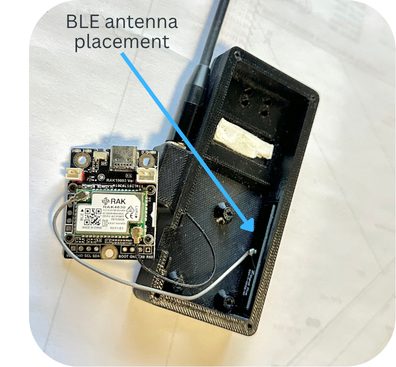
- Mount the board. Screw the RAK19003 into the case with the screws that came with the WisBlock kit. Snug is enough. Overtightening can crack the print or strip an insert.
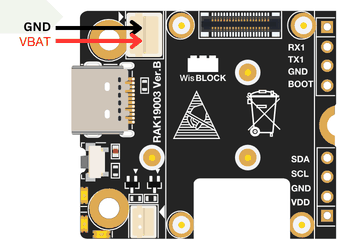
- Check battery polarity. Some batteries ship with the plug wired backwards. Both batteries in this post use a JST PH 2.0 plug that fits the RAK19003's battery jack. Neither listing says which side of the plug the red wire is on, though, and JST battery wiring is not standardized. RAK's battery connector diagram in the RAK19003 datasheet shows GND on the pin nearest the board's edge and VBAT (+) on the inner pin, toward the USB-C port. Make sure the red wire lands on VBAT. If it is backwards, lift each pin's small latch tab with a needle, slide both pins out of the plug, and swap them. A reversed battery can damage the board.
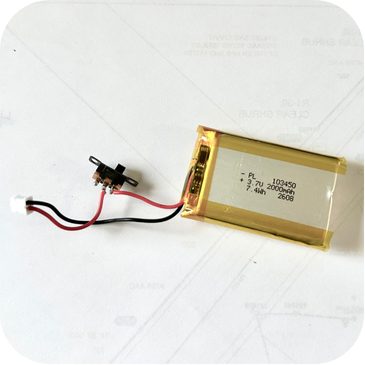
- Optional power switch. If your case has a power switch, cut the battery's red wire, leaving enough length to reach where the battery will sit. Solder the two cut ends to the switch's center pin and one of its edge pins, and cover the joints with heat-shrink.
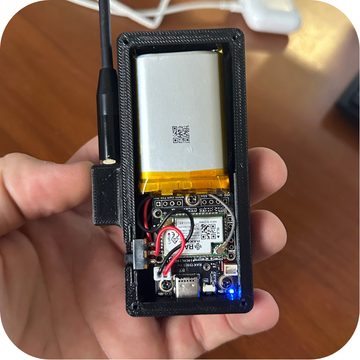
- Battery last. Before you plug the battery in, make sure the plug is wired correctly and your antenna is installed. Then plug it in and watch for the red charge LED when USB-C is connected.
- Close it up. Leave a little air around the battery, and do not let a screw press into the pouch. Put the cover and pocket clip back on with the M2x8 screws.
Companion, not repeater
A companion node is your personal radio. It talks to your phone and sends your messages into the mesh. It does not forward other people's traffic. If you want to extend coverage for the neighborhood, that is a repeater job. Our repeater vs companion vs room server guide explains the difference. If you want to build one, start with our solar mesh node planning guide.
Rather not print and solder?
The Brazos Valley Mesh Pocket Mesh Node is built on the same RAK19003 base. It comes flashed with MeshCore or Meshtastic, your choice. If you are joining us in Bryan–College Station, we recommend MeshCore. Buying the parts above and building your own is just as welcome.
FAQ
What parts do I need for a DIY MeshCore companion node?
A RAK WisBlock Mini kit (RAK19003 + RAK4631, US915), a protected 3.7 V LiPo with a JST PH 2.0 mm plug, and a case. For better range, add a 915 MHz SMA whip and a U.FL to SMA-female pigtail. Flash MeshCore companion firmware at flasher.meshcore.io.
Slim or Nano?
Pick the Slim if range and battery matter more than size. The whip and about 2000 mAh make it the better daily driver. Pick the Nano if you want the smallest node that disappears in a pocket and you are usually near a repeater.
Will any 3.7 V LiPo work?
Only if it has a 2.0 mm JST PH plug, the right polarity for the RAK, and ideally a protection circuit. RAK's battery connector diagram puts VBAT (+) on the inner pin and GND on the pin nearest the board edge. Make sure the red wire lands on VBAT.
Can I run Meshtastic on this instead?
Yes. The kit actually ships with Meshtastic on it. Around Bryan–College Station, we recommend MeshCore so you can use the local repeaters. Our MeshCore vs Meshtastic guide explains why.
How long does the battery last?
We have not run a formal drain test on these exact builds, so we won't quote hours. The nRF52840 is a very low-power chip. Bigger battery, fewer adverts, and turning off features you don't use all help.
Related
- First MeshCore node under $70
- 915 MHz antenna upgrade guide
- MeshCore repeater vs companion vs room server
Gear links
- RAK WisBlock Mini starter kit, US915: Amazon · Rokland
- Muzi Works 915 MHz 17 cm whip
- JLJLUP 103450 2000 mAh LiPo, 2-pack (Slim) (sold out? PKCELL 803860 2000 mAh)
- Qimoo 102535 850 mAh LiPo (Nano) (sold out? 102535 850 mAh alt)
- M2 heat-set inserts · M3 heat-set inserts
- Gorilla Clear Grip (sold out? Clear Grip 3 oz 2-pack)
Prices were checked on Nov 1, 2026, and they move. Check the product page before you order.